

Webhooks (handle received SMS + more)
There are 4 webhooks that we can send to your server (or custom no-code workflow):
Received messages - Triggered whenever you receive a message.
Sent messages - Triggered whenever you dispatch an action for sending SMS.
Failed messages - Triggered whenever a message fails (in case of failed messages you firstly get a Sent message webhook, and then failed message webhook)
Changed contact tag - Triggered whenever a contact tag is changed (E.g. Cold -> Warm)
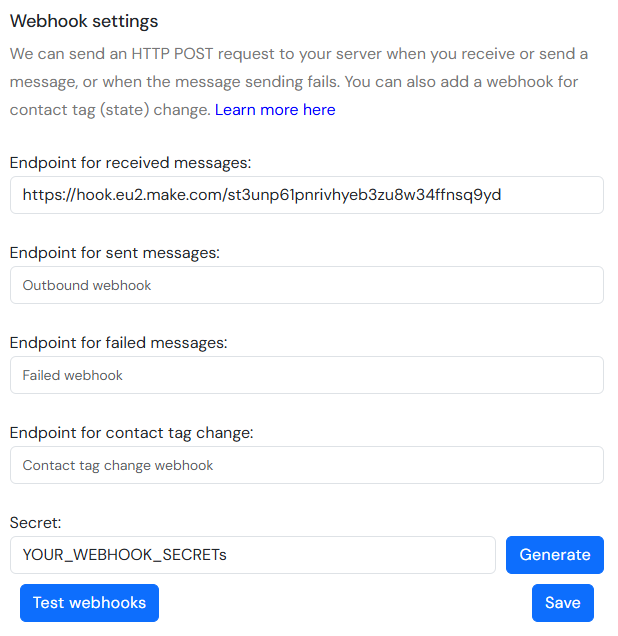
How it works
To make BluBubl send request to your webhook, you just need to plug it in the corresponding webhook url field in our API console, and click save. You can click Test webhooks button to get a sample request to each of your webhooks and to see if they are working. Maximum length of webhook string is 300 characters.
Webhook request contains JSON body like this:
Though fields can differ based on webhook type.
If your webhook does not return status 200, we will assume that the request was not successful, and we will notify you about it via e-mail.
(Optional) Webhook authorization
If you specified a secret, we will send it to you in each request (in the request body), so you can verify the request is coming from BluBubl's servers. Make sure it is a secret string that only you know.
Webhook endpoint setup
To handle our HTTP POST request, you can use any web application framework, such as Laravel, Django, Express.js, Spring or ASP.NET.
Here is the example of the endpoint definition for Express.js:
Example payloads
Received message
Where tag is the custom tag defined in the Chat app or update tag API request, and name is the name of the contact (if you have created a contact for that phone number).
Message dispatch (sent message)
portal is true if message is sent through Chat App, and sim_card_id is the id of the SIM card that the message was dispatched to.
Failed message
portal is true if message is sent through Chat app, and sim_card_id is the id of the SIM card that the message was dispatched to. custom_id is the custom id you have provided in the send SMS API if you provided it, and blububl_id is the message ID in the BluBubl database.
Tag change
name the name of the contact (if you have created a contact for that phone number), tag is the name of the new tag, and subuser_id is optional parameter that shows your BluBubl subuser ID that received the webhook, if it was sent to a subuser and not to the admin account.
Last updated